AgentLens
Usage archive for coding agents · cross-platform desktop app
A desktop dashboard for the question “what have these agents actually been doing, and on which machines”. After a few machines, four coding agents and tens of thousands of sessions, nobody can answer “how much ran this month, where did it go, and on which host” from memory. AgentLens pulls those records into one place, then tells you honestly which of its numbers are trustworthy and which are not.
- v0.0.7
- 2026-08-13
The problem it solves
Coding-agent usage records sit in separate local databases: one for OpenCode, one for Claude Code, one for Codex, one for Hermes. They don't agree on field semantics, they don't rotate the same way, and there is nowhere that puts them side by side.
One agent on one machine needs none of this — its own UI is enough. Trouble starts at the second machine: a workstation, a build box, a dev container in the cloud, each accumulating its own history, none of them knowing the total. And when one of those machines is reimaged or its data directory is wiped, that stretch of history is simply gone.
Then there is cost. Most tools hand you one figure without saying how much of it is real upstream billing, how much is a local estimate from a price catalogue, and how many records had no price at all. Add those three together and you get a number that looks precise and cannot support a single decision.
Who this is for
- Developers on several machines
- A local host plus a remote build box or dev container, with usage spread across all of them and no combined view.
- People running more than one agent
- OpenCode, Claude Code, Codex and Hermes in rotation — four sets of records that do not measure the same things the same way.
- Anyone reconciling spend
- You want to know which model, which project and which agent the money went to, and how much to trust the number.
The actual interface
Four real screenshots, not renders. All in the default Graphite Light theme except the one marked Deep Blue. The interface currently ships in Chinese.
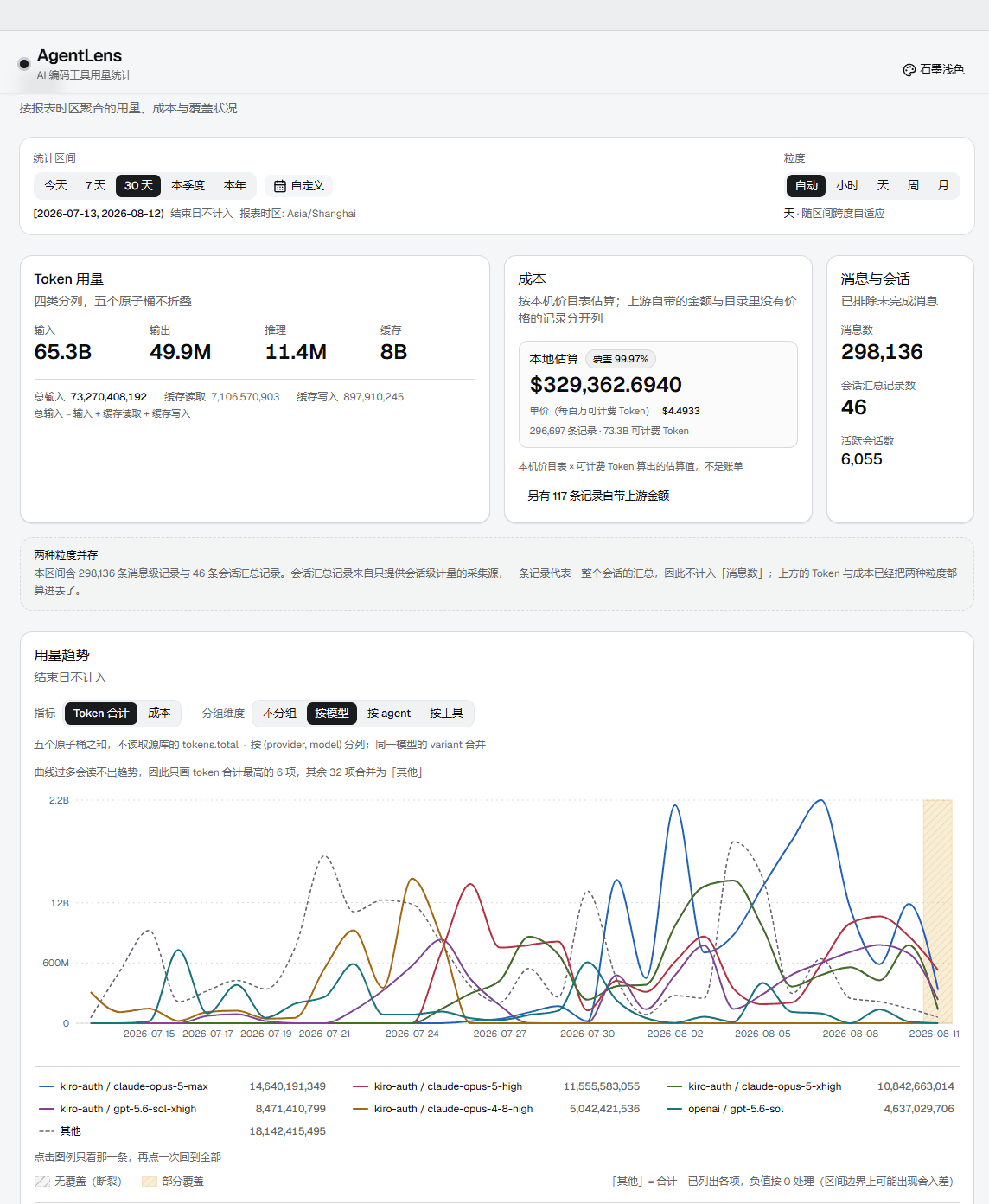
The overview page, cropped to the content area — the original is an ultrawide window capture whose empty side margins would shrink the interface text past reading. Tokens stay split across five atomic buckets rather than collapsing into one total. The most prominent figure on the cost card is the price per million billable tokens — the only number that compares across models — with a note beside it saying how many records the estimate covers. In the chart, hatched blocks are buckets with no data coverage and tinted blocks are partial coverage. Neither is zero.
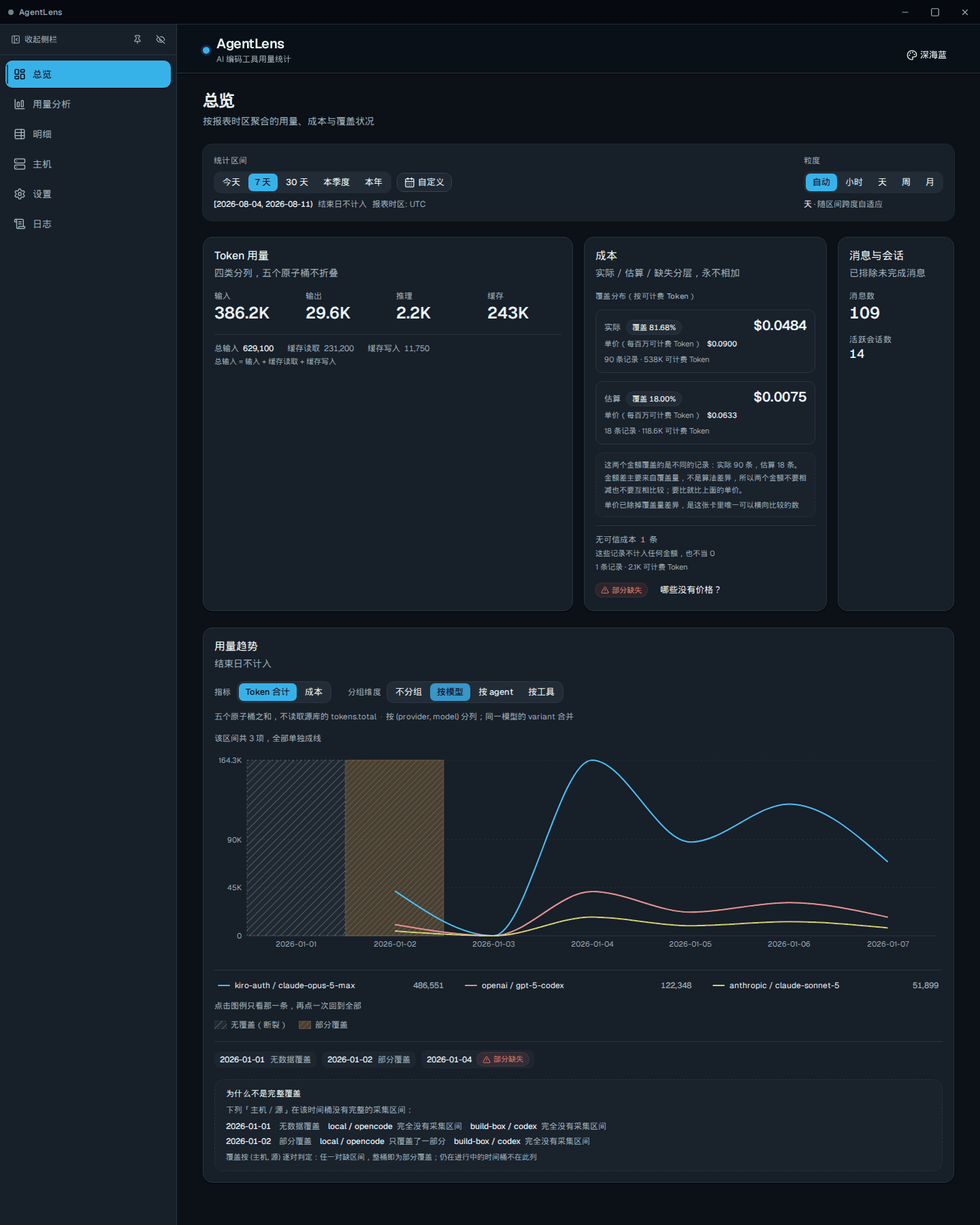
The same trend chart grouped by model, in the Deep Blue theme. Grouping and theme both switch in place from the title bar — no trip to a settings page. Too many lines make a trend unreadable, so only the highest-volume series are drawn and the rest merge into one “other” line.
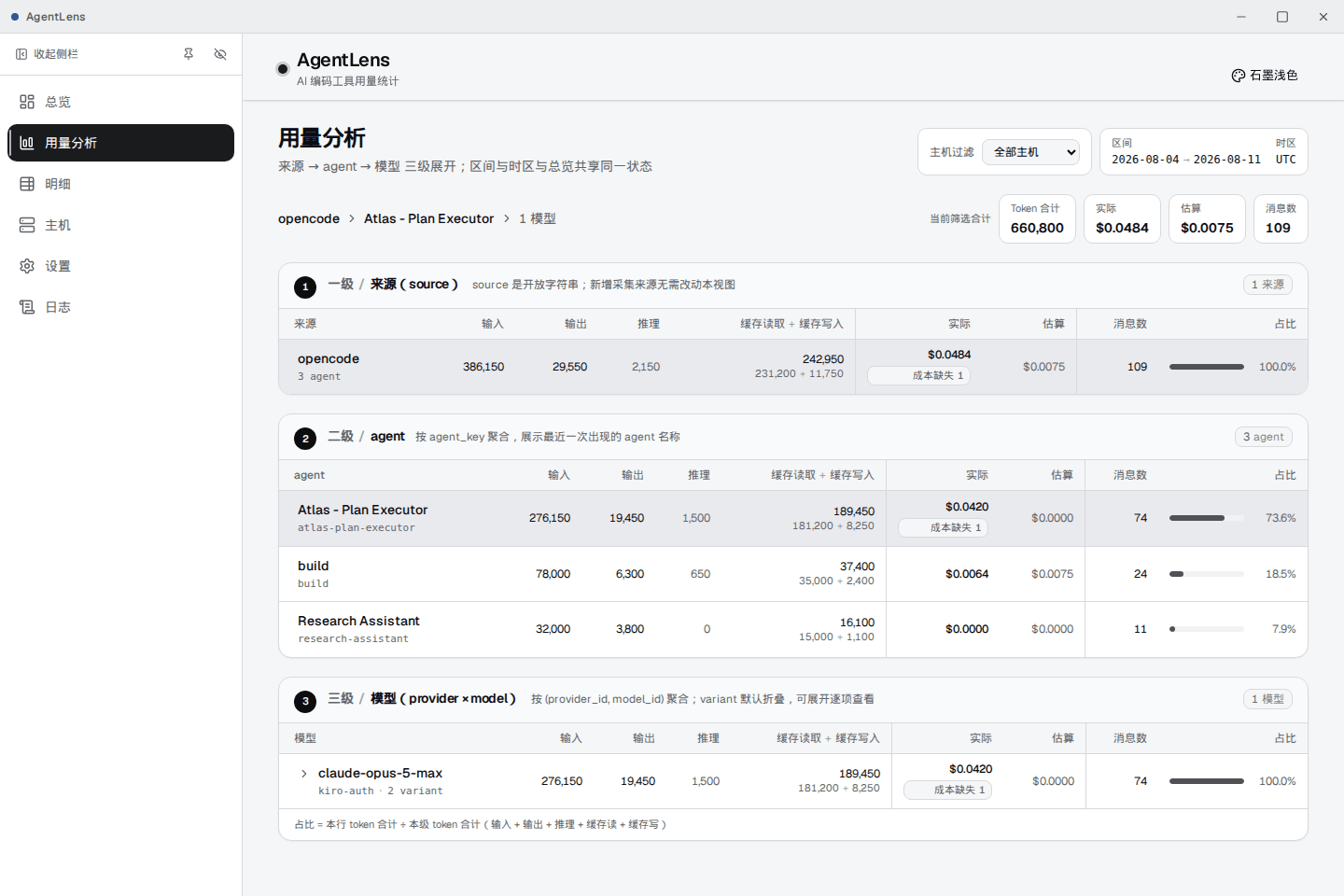
Usage analysis, drilling source → agent → model, sharing range and timezone state with the overview. A row with no price carries a “cost missing” badge instead of a zero — a zero would read as “this usage was free”. Share is computed against the total at that level only; it never borrows a denominator from the level above.
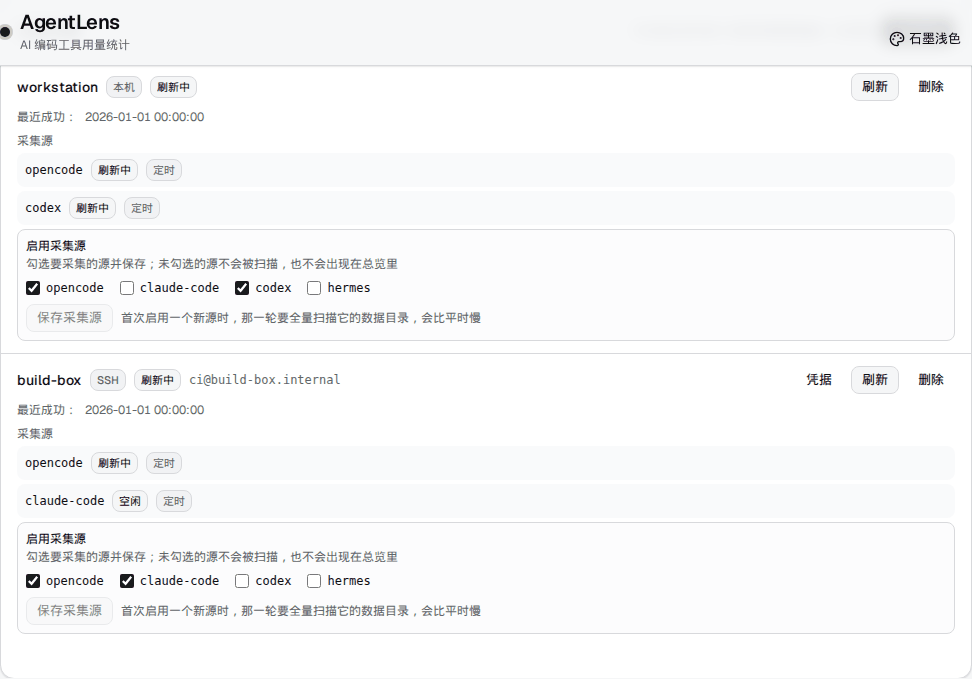
The hosts page puts the local machine and SSH remotes side by side. Source toggles live on each host card rather than in settings, because whether a source is collected on this machine and on that one are genuinely two different decisions. Only OpenCode is enabled by default.
What it does
- The local machine registers itself the first time you open the hosts page — nothing to configure. Remote hosts are added over SSH; hit “test connection” and the machine-identity hash is filled in from the probe. Only OpenCode is collected by default; Claude Code, Codex and Hermes are each enabled per host card. The first run after enabling a new source has to scan its whole data directory, so it is slower than the rest.
- Trends grouped by reporting timezone, agent, model or project, with a drilldown all the way to the individual record. Range presets cover today, 7 days, 30 days, quarter, year and custom; granularity is automatic or pinned to hour, day, week or month.
- Input, output, reasoning, cache read and cache write stay as five separate atomic buckets. They are never folded into one total, and the source database’s own precomputed total is never read.
- Buckets with no data and buckets with partial data get distinct fills in the chart rather than a line dropping to zero. Missing data and a genuine zero have to be distinguishable at a glance.
- When one model is reached through different gateways, the catalogue entry usually hangs off the owning provider only, so matching strictly on (provider, model) leaves large stretches unpriced. Cross-provider fallback is therefore allowed: measured over 251737 records, the priceable share went from 0.1% to 99.4%. Manual price overrides are the exception — they still match exactly and never spill.
- Local and remote collection can both be set to refresh automatically, remote on its own interval. The floor for both is 600 seconds.
- Calendar bucketing has exactly one implementation, in the Rust backend. The frontend ships no date library at all; labels arrive already bucketed in the reporting timezone and are never converted a second time. That is why every page reports the same numbers.
- SSH secrets go only into the OS keychain — Secret Service on Linux, Credential Manager on Windows. They never land in a config file and are never handed back to the UI over IPC.
Three things it must not get wrong
The archive is authoritative history
When a source database rotates, a backup is deleted, or a remote data directory is wiped entirely, the archived records are still there. The archive is one local SQLite database with deduplication and a per-source watermark. It is not a cache of the sources; it is the copy that outlives them. This is the premise the whole tool rests on — a dashboard that shrinks along with its sources has no history at all.
Remote collection only reads
A statically linked musl collector is pushed to the remote, its SHA-256 verified, executed in place, and it removes itself on exit. It writes none of the remote tool’s data. The remote command on the SSH side is constant; only the payload passed as a positional argument varies, so the command itself is never assembled by string concatenation.
An unknown cost is never written as zero
A record with no price is marked missing and shows a “cost missing” badge, not 0.0000. It looks like the smallest of the three, and it is the one that decides whether the cost figures are usable at all: once missing renders as zero, every sum, every share and every “we spent less than last month” is wrong — and wrong in a way you cannot see.
How cost is computed
Three kinds of amount are kept apart and never added into one “total spend”. This is the most practical difference between AgentLens and most usage tools.
Upstream amount included
The record carries a billed amount returned by the provider. It came from someone else’s price list and is not comparable with a local estimate, so it sits behind its own entry point and is never merged into the estimate.
No price in the catalogue
The model has no entry in the local price list. These records do not even have a complete billable base, so they are marked “cost missing” and take part in no sum and no share.
Local estimate
The local price list multiplied by billable tokens. This is the one column that compares across rows, and it always carries the count of records it covers so you can judge for yourself how much the estimate is worth.
The only figure that genuinely compares across models and across time is the price per million billable tokens, so that is what the cost card puts front and centre — not the grand total, which is the number that most looks like a bill and is not one.
Getting it onto your machine
Three prebuilt packages. The one-line script detects the platform, verifies SHA-256 against the release manifest, and does not elevate on its own. You can also download from the releases page and verify by hand.
Prebuilt packages
- Linux x86_64
- .deb
- Windows x64
- NSIS installer
- macOS aarch64
- .dmg
# Linux and macOS
$ curl -fsSL https://raw.githubusercontent.com/sunerpy/AgentLens/main/scripts/install.sh | bash# Windows, PowerShell
$ irm https://raw.githubusercontent.com/sunerpy/AgentLens/main/scripts/install.ps1 | iex# or, rather than piping a script to a shell — download from releases and verify
$ sha256sum -c sha256sums-linux.txt# then install the verified package
$ sudo apt install ./AgentLens_*_amd64.debAfter installing
Open the hosts page; the local machine registers itself. To collect from a remote, add an SSH host, hit “test connection”, then tick the sources you want on that host card — only OpenCode starts enabled.
How it is built
- Rust. The core crate handles the archive, parsing, aggregation and SSH transport; the remote collector is a separate static musl single file; the askpass helper is the SSH_ASKPASS counterpart, shipped in the package.
- Tauri 2 — host process, IPC commands and tray.
- React 18 on Vite, Tailwind CSS 4 for styling, Recharts for charts, TanStack Query for data.
- SQLite, statically linked through rusqlite — no system library to install. The archive carries deduplication and a per-source watermark.
- The Rust/TypeScript types are generated from the Rust side by ts-rs rather than hand-written, so the boundary cannot drift quietly.
- Linux .deb, a Windows NSIS installer, and a macOS aarch64 .dmg.
Maturity, stated plainly
v0.0.7, released 2026-08-13. This is an early version: it installs, it works, it gets used daily — and the version number is an accurate description of where it stands, so there is no reason to dress it up. The interface is still moving and the measurement rules will keep tightening.
The three-platform CI matrix is green on main, and all three platforms have produced real installers in the build pipeline. But a green run only means no defect reproduced; it does not mean the product comes up on that machine. The distance between those two statements is worth writing down.
Real-machine verification, as it stands
- Windows: verified
- Installed and launched on Windows Server, with 25 machine-decidable GUI assertions all passing.
- Linux and macOS: packaged only
- Both platforms produce installers, but neither has had the equivalent real-machine launch verification. That is not “it should be fine” — it is “it has not been checked”.
Test surface
426 Rust workspace tests, 560 Vitest unit tests, 151 component-level Playwright tests against mocked IPC, and 8 WebdriverIO specs driving a real Tauri WebView over a 155k-row archive; line coverage measured at 92.72% with a 90% floor enforced in CI. Those numbers say the code is tested. They do not say every platform’s installer has been opened by a human.