
New-torrent notifications
Besides downloading through RSS, pt-tools can tell you about new torrents as they appear, through a QQ private chat or a Telegram private chat. This guide shows how to turn it on and how to tune the notifications until they suit you.
Overview
New-torrent notifications are a stream of events separate from automatic downloading:
| Mode | When it fires | What it is for |
|---|---|---|
| No notifications (不通知) | - | Turns notifications off for this subscription |
| All new torrents, brief (全部新种(简略)) | As soon as the feed brings in a new item | Every new torrent, with the title and link only; no extra request to the site |
| Matches only, detailed (只通知匹配的(详细)) | After the details page is read and a filter rule matches | Only what you really follow (a series, a Blu-ray release); needs the details to decide |
| Both, matches detailed (都通知 + 匹配的给详细) | Both of the above, combined | Nothing is missed, and matches show the full details; no duplicate notifications |
Notifications and automatic downloads are independent: you can be notified without downloading, download without being notified, or do both.
Notifications are delivered through ChatOps notification channels, so you need a working notification channel first; see:
Getting started in 5 steps
Step 1: prepare a notification channel
Create at least one notification channel (QQ or Telegram) as described in the ChatOps quick start.
Under ChatOps → Notifications (消息通知), check that the channel is enabled, that its status is Connected (已连接) or Running (运行中), and that its test message arrives.
Step 2: turn on notifications in an RSS subscription
Open Sites → Site list (站点 → 站点列表), click the Site settings and RSS (站点配置与 RSS 订阅) button on the site's row, then create or edit a subscription on the RSS subscriptions (RSS 订阅) tab. Near the bottom of the dialog, in the Notifications (通知) section:
- Notification mode (通知模式): choose All new torrents (brief), Matches only (detailed) or Both; No notifications turns them off
- Notification channels (通知通道): choose the channel from step 1
- At most per hour (每小时最多): 100 by default; notifications beyond it are recorded as
throttled(see "Hourly limit" below)
Save, and it takes effect: the next time the subscription runs, new torrents trigger notifications.
Step 3 (optional): use filter rules to trigger notifications
If you chose Matches only or Both, you need at least one filter rule whose purpose is notifications.
Under Rules → Filter rules (规则 → 过滤规则), create a rule and set its Purpose (规则用途):
- Download (下载,
download): used for automatic downloads only (the default) - Notify (通知,
notify): used for notifications only; a match triggers a detailed notification - Both (两者,
both): triggers both
Note: after upgrading from a version that had no rule purpose, every existing rule is a download rule; change the rules you want notifications for to Notify or Both by hand.
Step 4 (optional): set quiet hours and the hourly limit
Under Quiet hours (静默时段) on the notification channel's details page (ChatOps → Notifications → click the channel):
- Do-not-disturb time range (不打扰的时间范围):
HH:MM, for example23:30→07:30 - The range may span midnight; leave both ends empty for no quiet hours
- Notifications during quiet hours are postponed until they end, not dropped
- Click Save basic information (保存基本信息) when done
In the RSS subscription's dialog:
- At most per hour: 100 by default; 0 means no limit
Step 5: wait for notifications, or troubleshoot
The next run of the subscription (every 10 minutes by default, at the subscription's check interval) fetches new torrents and triggers notifications.
ChatOps → RSS notification log (RSS 通知日志) shows, for every notification:
result: sent / failed / suppressed / pending / throttledattempts: how many delivery attempts were madelast_error: the latest error (for troubleshooting)payload_json: the title and text actually sent
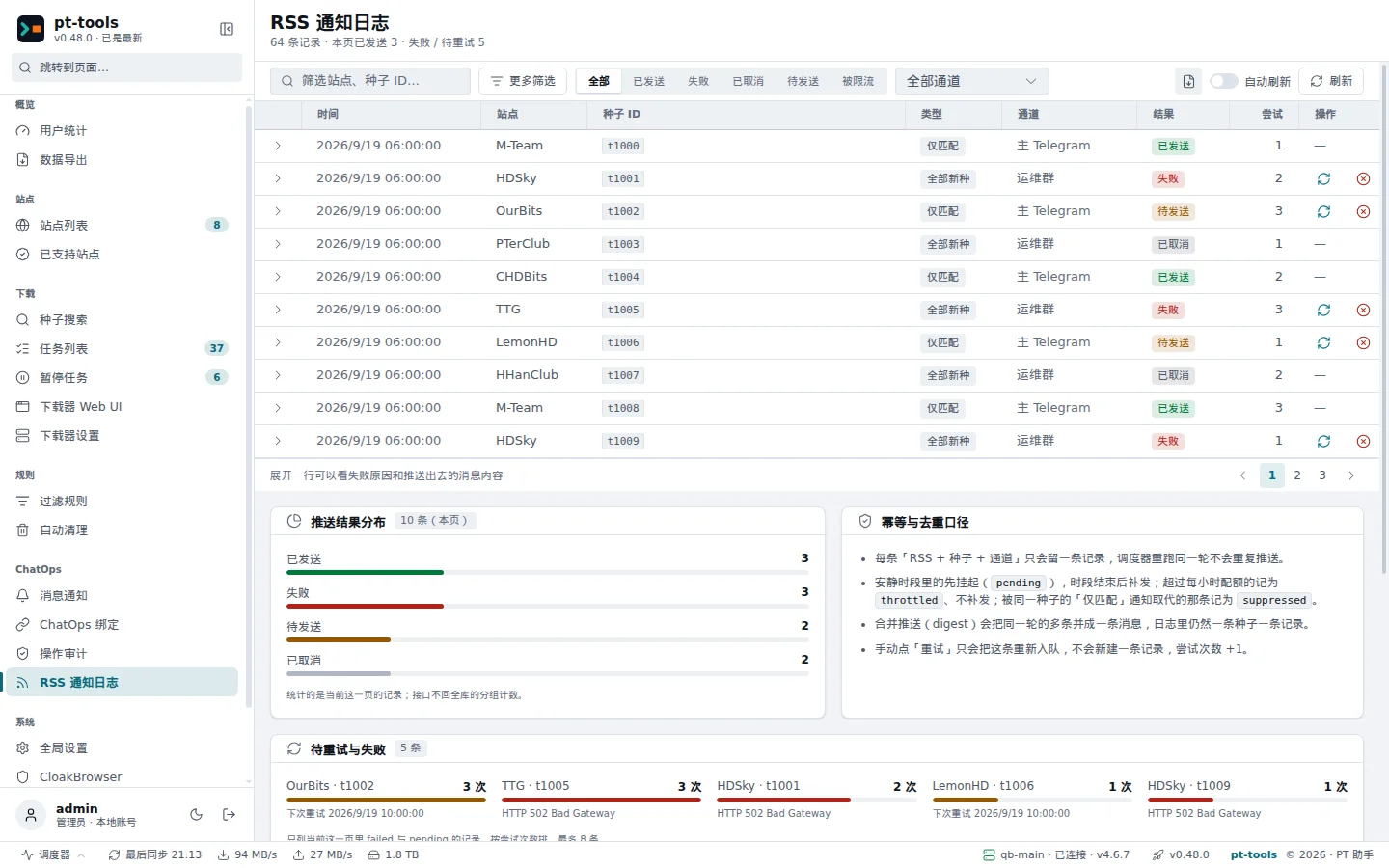
Web UI → ChatOps → RSS notification log (RSS 通知日志): filter by result, and expand a row to see why a delivery failed and the message that was sent.
The four modes in detail
No notifications (the default)
- What it does: turns notifications off for this subscription
- For: when you only want automatic downloads
All new torrents (brief)
Every new item in the feed triggers a notification with the title and link from the feed itself. The details page is not read, so the information is brief.
- When it fires: the moment the feed brings in an
<item> - Data: the feed's fields only (title, link, pubDate)
- No extra requests to the site: the details page is not read, which saves your request allowance
- For: ratio builders, and anyone who likes to glance at everything new
An example notification:
🆕 [hdsky] Test.Movie.2026.1080p

📅 2026-05-16 12:00
🔗 https://hdsky.me/details.php?id=12345
Matches only (detailed)
Torrents are matched against the rules after their details are read, and only torrents that match a rule trigger a notification, which then carries the full details (size, freeleech, rule name).
- When it fires: after the details page is read and a filter rule with the purpose Notify or Both matches
- Data: the details page (size, resolution, freeleech status, tags and so on)
- Uses site requests: shared with the normal automatic-download path
- For: following series, picking Blu-ray releases, choosing torrents (anything that needs the details to decide)
An example notification:
🎯 [hdsky] Test.Movie.2026.1080p

📦 12.34 GB
🆓 免费 (剩余 23h45min)
📌 匹配规则:4K 蓝光原盘
🔗 https://hdsky.me/download.php?id=12345
Both, matches detailed
Both of the above at once. When the same torrent triggers both, pt-tools combines them:
- The brief all-torrents notification is queued first
- When the details have been read and a rule matches, the brief one is marked
suppressed(it is not sent) and the detailed one is sent instead - The result: one notification per torrent; the detailed version for matches, the brief one for everything else
Suited to "I want to see every new torrent, but full details for the ones that match my keywords".
A unique index on (rss_id, site_name, torrent_id, notify_kind, conf_id) makes this idempotent: the same kind of notification is never sent twice for the same torrent.
Quiet hours
For when you work by day and sleep at night.
- Where: Quiet hours on the notification channel's details page (fields
quiet_hours_startandquiet_hours_end) - Format:
HH:MM(24-hour clock); both empty means no quiet hours - Spanning midnight:
23:30→07:30means quiet from 11:30 pm to 7:30 am the next day - Nothing is lost: during quiet hours the notification is stored in the database (result
pending), and the retry job delivers it once the quiet hours end
Quiet hours apply per channel: when a notification goes to several channels, only the channels in their quiet hours wait; the others deliver as usual.
Digests
Many new torrents in a short time are combined into a digest:
- Window: 30 seconds, counted per channel
- Threshold: 5 notifications
- Behaviour: as soon as 5 notifications for a channel have accumulated they are sent; otherwise they are sent when the 30-second window ends. Several notifications are combined into one numbered summary
There is currently no switch to turn digests off.
Retries
A background retry job checks the notification log periodically:
- It finds records with
result='pending'whose next retry time has come - It delivers them again with the original title and text
- Failures are rescheduled with exponential backoff: 5s → 10s → 20s → 40s → 80s
- After 5 failed attempts the record is marked
failed, andlast_errorkeeps the last error
failed records are not retried automatically. To deliver one again, click Retry (重试) on the record in the RSS notification log; pending records can also be retried or cancelled by hand.
Telegram inline buttons
Detailed notifications (Telegram only) carry two buttons:
- Download now: sends the torrent through the normal push path to the subscription's downloader (or the default downloader when none is set)
- Ignore: marks the notification record
suppressed, so it is not retried
After a button is pressed:
- pt-tools downloads or ignores the torrent
- The buttons are removed from the message, so they cannot be pressed twice
- Telegram shows a short notice at the top: "已加入下载队列 #123" (queued for download), "已忽略 #123" (ignored) or an error
Permissions: the user who presses a button must be listed in the Telegram channel's
allowed_usersoradmin_users; the buttons do not require a linked account. A user who is not listed gets the notice 您没有权限执行此操作 ("you are not allowed to do this").
QQ channels do not support inline buttons at present (OneBot has no matching message segment). Detailed notifications sent to QQ carry the text only.
Hourly limit
A subscription's At most per hour (100 by default) protects you from being flooded by a burst of new torrents.
- Window: a rolling hour (by the time each record was created)
- What counts: sent + failed + pending (throttled and suppressed do not count)
- Over the limit: a record with
result='throttled'is written; nothing is delivered and nothing is retried
To turn the limit off, set it to 0. Subscriptions upgraded from an older version start at 100 and have to be changed by hand.
Notification log fields
When troubleshooting, these fields of the RSS notification log page and of the database table rss_notification_log help:
| Field | Meaning |
|---|---|
id | Primary key |
rss_id | The ID of the RSS subscription |
site_name | The site's ID (such as hdsky or mteam) |
torrent_id | The torrent's ID on the site |
notify_kind | all / filtered |
notification_conf_id | The channel it was sent through |
matched_filter_rule_id | The rule that matched, for detailed notifications (may be empty) |
result | sent / failed / suppressed / pending / throttled |
attempts | The number of delivery attempts so far |
next_retry_at | The earliest time of the next attempt |
last_error | The text of the latest error |
payload_json | The title and text actually sent |
delivered_at | The time of the first successful delivery |
created_at / updated_at | Timestamps |
A unique index on (rss_id, site_name, torrent_id, notify_kind, notification_conf_id) keeps it idempotent.
A partial index on (result='pending', next_retry_at) speeds up the retry job's scan.
Troubleshooting
Q1: No notifications arrive at all. Where do I start?
Check in this order:
- Is the subscription's notification mode something other than No notifications?
- Do the subscription's notification channels include an enabled channel?
- Do the channel's quiet hours include the current time?
- Has the subscription's At most per hour been used up?
- Does the RSS notification log show recent
throttledorpendingrecords? - Is the channel itself working (Connected or Running on the notifications page, with the test message arriving)?
Q2: The log shows many throttled records. Is that normal?
On a busy site, peaks of new torrents easily exceed the default of 100 an hour.
- Raise the subscription's At most per hour (to 500, for example)
- Or switch to Matches only, with precise filter rules to cut the noise
Q3: Retries keep ending in failed. How do I fix it?
Look at last_error:
bot was kicked / blocked: you blocked the bot or removed it from the group; start the bot again in Telegramconnection refused/i/o timeout: the channel failed to send (NapCat's WebSocket half dead, an unstable connection to Telegram)rate limit exceeded: Telegram's servers are rate limiting; retry after a while
Once the underlying problem is fixed, click Retry on the failed records in the RSS notification log.
Q4: Matches only never fires
- Check that the filter rule's Purpose is Notify or Both
- Check that the rule really matches the torrent's title (edit the rule on the filter rules page and try it with Test match, 测试匹配)
- Check that the rule is attached to the RSS subscription (Filter rules in the subscription's dialog)
Q5: The same torrent was notified several times in all-torrents mode
That does not happen: the unique index on (rss_id, site_name, torrent_id, notify_kind, conf_id) makes the writes idempotent. If you see duplicates, the likely cause is two different RSS subscriptions for the same feed, each counting on its own.
Q6: How do I clear the whole notification log?
Stop pt-tools and back up torrents.db first, then run:
DELETE FROM rss_notification_log;There are no foreign keys. The log is only used for auditing and retries; clearing it does not affect downloads.
Q7: Can a QQ channel receive detailed notifications too?
Yes, with the same text. QQ has no inline buttons, so they come without Download now / Ignore.